Grok Imagine Video 1.5 Prompt Guide: Audio-Visual Sync, Formulas & Examples (2026)

Date: June 4, 2026 (Updated)
Author: Jsam (Klingaio Technical Team)

The preview release of Grok Imagine Video 1.5 (identified in the xAI API as grok-imagine-video-1.5-preview) marks an impressive milestone in generative media. Unlike traditional image-to-video pipelines that output silent frames, Grok Imagine 1.5 processes video tokens and audio waveforms jointly in a single unified transformer pass. Foley, environmental ambience, and visual motion are intrinsically synchronized on the generation timeline.

To help you get the most out of your creations, this technical guide breaks down how to optimize the model's physics, utilize the cleanest audio-visual prompting syntax, and get excellent results on every render. You can test these techniques directly using our Grok Imagine 1.5 Video Generator portal.

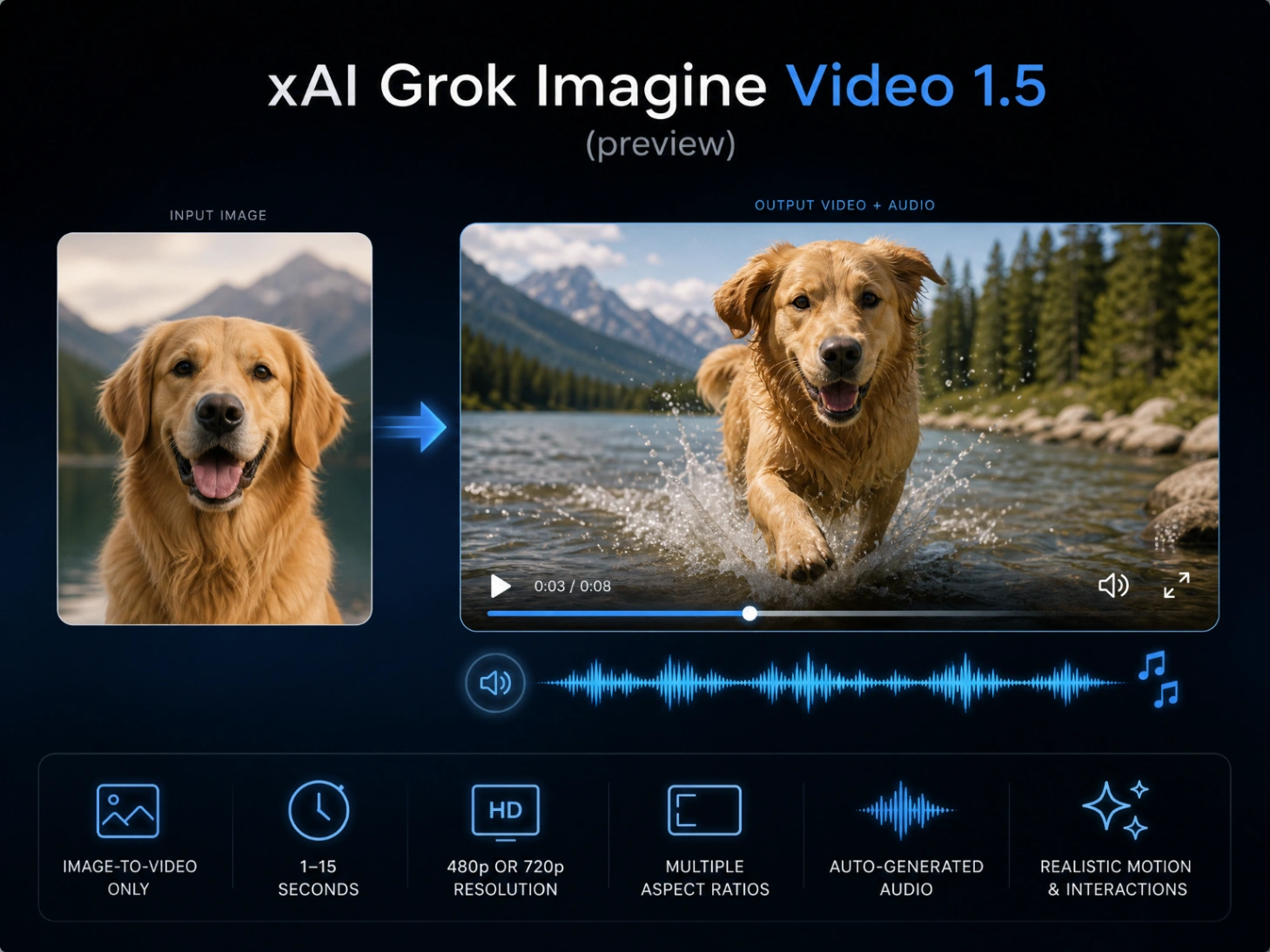
Diagram showing the features of Grok Imagine Video 1.5

Performance and Motion Strengths: Understanding the Model

Grok Imagine Video 1.5 Preview is an Image-to-Video (I2V) engine. By using a static reference image to establish scene geometry, texture, and character identity, the model can generate fluid, high-fidelity motion with highly integrated audio.

Our hands-on tests and community feedback highlight several defining strengths:

  • One-Pass Synced Foley: Sound effects and ambient acoustics are synthesized relative to visual movement. When a physical impact occurs on-screen, the associated audio is bound directly to those specific generation steps.
  • Aspect Ratio Versatility: The model natively supports multiple canvas outputs, including standard cinematic 16:9, social-first 9:16, and 1:1, rendering at high-quality resolutions.
  • Temporal Flexibility: Finding Your Sweet Spot (5s vs. 15s): Grok Imagine Video 1.5 natively supports generation lengths up to 15 seconds, and the overall output quality remains remarkably robust throughout the entire duration. While the full 15-second capability works beautifully for wide cinematic pans and environmental shots, a rendering duration of 5 to 8 seconds serves as the optimal sweet spot for high-action choreography and micro-expression lip-syncing. Beyond the 8-second mark in longer clips, you might occasionally notice extremely minor, subtle drift in audio-visual synchronization—such as slightly delayed lip movements—but these instances are generally barely noticeable and do not detract from the overall viewing experience.

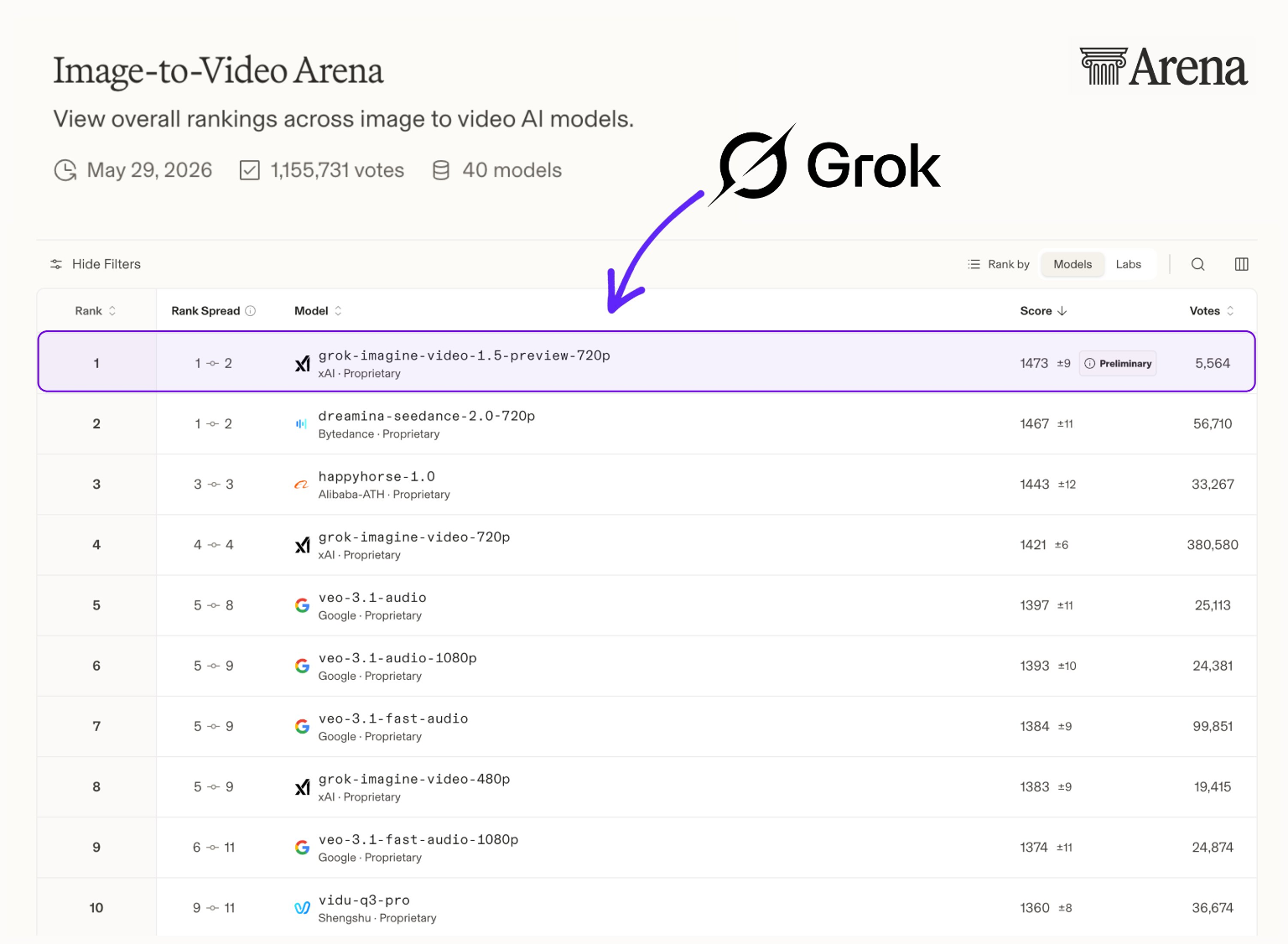
Leaderboard Note: Grok Imagine Video 1.5 Preview currently sits at #1 on the Arena AI Image-to-Video leaderboard, showcasing excellent crowd preference for its native audio capabilities.

Grok-Imagine-Video-1.5-Preview (720p) ranks first on the Image-to-Video Arena leaderboard with a massive Elo rating jump

Structuring the Prompt: The Syntactical Flow

A common technical misconception is that Grok Imagine 1.5 requires a separate API parameter for audio. In reality, the unified model processes a single, continuous text sequence.

However, because transformer attention mechanisms allocate weight based on token positions, separating visual choreography from acoustic prompts using a clear text delimiter prevents the model from blending physical descriptions with sound generation.

We recommend using the following syntactical hierarchy to cleanly organize your prompts:

[Subject Motion + Intensity Modifiers] + [Camera Movement & Shot Type] + [Lighting & Atmosphere Changes] + AUDIO: [Ambient Noise, Action Foley, Dialogue Directives]

Prompt Efficiency Comparison

Using vague adjectives like "cinematic sound" causes the engine to fall back on generic background music. Specific action-sound mapping is necessary for accurate synchronization:

Prompt ElementStandard Ambiguous PromptAudio-Visual Optimized Prompt
Visual Action
(Subject Motion + Intensity)
A blacksmith working on hot metal.The blacksmith swings a heavy iron hammer down onto glowing orange metal with high force, sending bright sparks flying outward.
Camera Control
(Camera Movement & Shot Type)
Zoom in.Macro dolly-in focusing closely on the impact point.
Lighting & Atmosphere
(Lighting & Atmosphere Changes)
Workshop background.Dimly lit workshop environment with intense orange firelight casting deep, flickering shadows.
Audio Cues
(AUDIO: Ambient, Foley, Dialogue)
AUDIO: workshop sounds, epic noiseAUDIO: a heavy metallic clang of a hammer, followed immediately by sizzling iron and the low hum of a forge fire, all echoing deeply within a brick-walled workshop.

5 Advanced Grok Imagine Video 1.5 Prompt Examples (Ready-to-Use)

To test these setups, generate your highly detailed starting frame first (using an advanced image generator like Nano Banana Pro or GPT Image 2), then input the image and the corresponding prompt structure into the Grok Imagine 1.5 Web App.

1. Macro Foley & Mechanical Physics

Use Case: Frame-accurate audio-visual synchronization of physical impacts.

Slow-motion, macro tracking shot of water droplets dripping from a rusty pipe onto a puddle of water. Each droplet impacts the water surface, creating concentric ripples. 
AUDIO: deep hollow drip sounds, water splashing softly with high-pitched drops, distant low rumble of a thunder storm echoing outside.
  • Why it works: Aligning physical impact verbs ("droplet impacts") with specific, onomatopoeic sound adjectives ("hollow drip", "splashing softly") guides the model to tie the sound waveform directly to the visual frame where the ripple begins.

Input Image: Grok Imagine 1.5 Starting Image: Macro shot of water droplets on a rusty pipe

Generated Video:

2. Dialogue & Lip-Sync Coordination

Use Case: Basic voice synthesis with matching facial animation.

The detective slowly turns his head to the right and speaks directly to the camera, a subtle handheld camera shake adds tension.
AUDIO: a quiet, gravelly whisper: 'We made it. But the clock is ticking.' Faint background paper rustling, low ticking clock.
  • Why it works: Isolating the spoken lines within quotation marks directly after the AUDIO: prefix helps the transformer distinguish spoken dialogue from environmental sound effects, resulting in cleaner lip synchronization.

3. Product Motion & Environmental Ambience

Use Case: Studio-level commercial aesthetics with spatial acoustics.

The espresso cup rotates smoothly on the pedestal, camera orbiting at eye level, a warm golden hour light sweeping across the surface of the marble countertop.
AUDIO: high-pressure hiss of steam, hot espresso dripping steadily into the cup, gentle clinking of porcelain, soft background jazz.
  • Why it works: The prompt contrasts steady visual motion (rotating pedestal) with intermittent ambient sounds (hiss of steam, dripping espresso), establishing a convincing commercial-style acoustic space.

Input Image: Grok Imagine 1.5 Input Image: Luxury espresso machine on a marble countertop with hot coffee pouring

Generated Video:

4. Dynamic First-Person Action (Speed Physics)

Use Case: Forcing high-velocity motion and corresponding heavy bass impacts.

FPV drone shot weaving through a narrow, dark metal corridor of a starship. Red emergency warning lights flash rhythmically. A heavy steel blast door slowly slides shut.
AUDIO: loud, deep mechanical grinding of the heavy steel door sliding, warning sirens blaring, a low-frequency hum of a spaceship reactor core.
  • Why it works: Heavy environmental interactions (sliding metal doors) paired with low-frequency audio tags ("low-frequency hum", "mechanical grinding") force the model to render heavy, weighted visual movements.

5. Multi-Shot Sequence Continuity (15s Sequence Control)

Use Case: Dividing a 15-second generation into discrete beats.

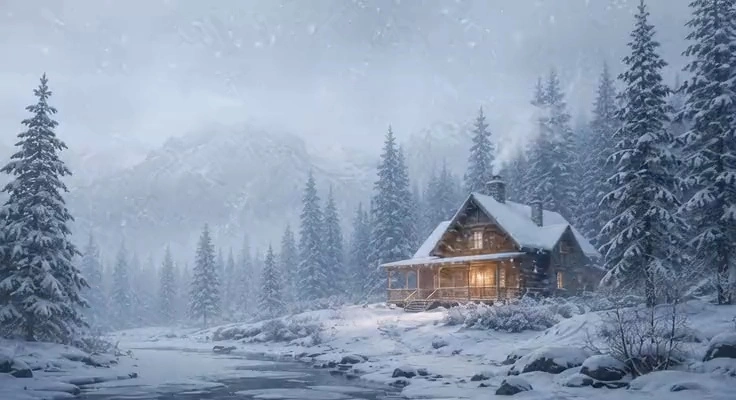
(0-3s) Wide establishing shot of a quiet cabin in a snowy pine forest during a soft winter blizzard. 
(3-7s) Cut to an interior close-up shot of a rustic stone fireplace with crackling firewood; then, a hand slowly pours steaming hot tea into a wooden mug. 
(7-12s) Cut to an over-the-shoulder shot of a person looking out of the cozy cabin window at the falling snow, smiling gently. Glossy, warm, cinematic.
AUDIO: (0-3s) muffled howling winter wind outside, (3-7s) crisp crackling of a fireplace and a soft liquid pouring hiss, (7-12s) gentle acoustic guitar melody and a soft contented sigh.
  • Why it works: Using strict timestamp tags like (0-3s) and (3-7s) inside both the visual and audio segments directs the model's timeline window to trigger abrupt transition cuts, mitigating the typical "morphing" artifact common in multi-second generation passes.

Input Image: Grok Imagine 1.5 Reference Frame: Cozy wooden cabin in a snowy pine forest during a winter blizzard

Generated Video:

Pro-Tips: Optimizing Your Video Outputs

1. Enhancing Dynamic Motion

  • The Opportunity: The model's default physics excel at cinematic, steady-state motion.
  • The Optimization: To inject higher speed or dramatic action, use high-velocity verbs and descriptive reactions. For instance, instead of prompting "a car driving by," try "a car racing past the camera at high speed, kicking up a sudden cloud of dust."

2. Maintaining Text and Logo Stability

  • The Opportunity: The model’s fluid physics generator naturally prioritizes cinematic motion and organic environmental changes.
  • The Optimization: If your starting frame contains intricate branding, labels, or text, pairing the generator with linear camera movements (such as slow dollys or static zooms) helps maintain maximum text stability throughout the clip.

3. Focusing on Positive Prompting

  • The Opportunity: The unified transformer architecture of Grok Imagine 1.5 is engineered to excel at direct visual and audio synthesis.
  • The Optimization: Rather than spending tokens on negative prompt lists (like "no bad anatomy"), the model responds best when you focus your inputs entirely on rich, positive directives. Describing the exact visual state you wish to see yields much cleaner, more stable results.

Frequently Asked Questions (FAQ)

Q: Does the Grok Imagine Video 1.5 Preview support text-to-video (Text-to-Video) generation?

A: No. The current 1.5 Preview (grok-imagine-video-1.5-preview) is strictly an Image-to-Video (I2V) model. This means every generation run requires uploading a static starting image to serve as a reference for the scene's geometry, colors, and subject. If you need to generate video directly from text prompts alone, you may want to consider using a dedicated text-to-video (T2V) model.

Q: How can I better guide or control the background sound effects in my prompts?

A: Since this model processes visual frames and audio waveforms jointly within the same Transformer network, you can influence the soundtrack simply by describing the sounds in your prompt. For optimal synchronization, we recommend appending a clear text delimiter (such as AUDIO:) at the end of your prompt, followed by descriptions of your desired background music, environmental noise (such as wind or crowd chatter), action-specific sound effects (like glass shattering or engines revving), or short dialogue lines.

Q: What image formats, resolutions, and aspect ratios does this model support?

A:

  • Supported Input Formats: JPG, JPEG, PNG, and WEBP.
  • Supported Output Resolutions: 480p and 720p.
  • Aspect Ratios: It supports a wide range of compositions, including 16:9 (widescreen), 9:16 (vertical mobile format), 1:1 (square), as well as 4:3, 3:4, 3:2, and 2:3. If you select "auto", the system will automatically match the native dimensions of your uploaded source image.

Q: How can I reduce the chances of visual distortion or audio-visual desynchronization during generation?

A: Based on our multi-dimensional testing, the following adjustments can help improve output quality:

  1. Control the Duration: Although the model supports rendering lengths from 1 to 15 seconds, the stability of physical motion and audio rhythm is strongest within the 5-to-8-second range. Longer clips (e.g., 12 to 15 seconds) are more susceptible to minor visual morphing or subtle audio-visual drift in the latter half.
  2. Simplify the Prompt: Avoid stacking generic quality tags (such as "8K" or "highly detailed"). Instead, focus on a clean structure: "one primary moving subject + one camera path + specific action verbs."
  3. Avoid Negative Prompts: The model does not reliably recognize negative directives (e.g., what not to include). Negative prompts are generally ignored, so it is best to describe only what you want to see.